TCR: test && commit || revert
Exploring the TCR (test && commit || revert) technique introduced by Kent Beck, its variations, and a practical example with Rope in Python.
Miguel Fernandez
Introduction
Kent Beck first introduced the idea of test && commit in his article Limbo on the Cheap. In the article, he discusses how, in order to test a technique for scaling collaboration in software projects called Limbo, he carried out its implementation and experimentation.
It's then that he mentions that to ensure neither developer breaks the other's code when propagating changes, he uses the following command, which runs a script that builds the system and executes the tests:
$ ./test && commit -am working
Although it doesn't include revert, he indicates that if the tests failed, the changes were reverted, but he explains this more thoroughly in another article.
Development
The main article dedicated entirely to this technique is test && commit || revert. In it, the previous idea of test && commit is expanded with the reset --hard command, meaning that if the tests fail, not only is the commit prevented but the changes are also reverted.
$ ./test && git commit -am working || git reset --hard
At first glance, this may seem like a very risky technique, and even Kent Beck himself was skeptical initially:
"Oddmund Strømme, the first programmer I've found as obsessed with symmetry as I am, suggested that if the tests failed the code should be reverted. I hated the idea so I had to try it."
In general, most people ask some of these questions (and it's completely normal) as soon as they learn what this technique is about:
- How are you going to make progress if the tests always have to pass? Don't you ever fail?
- What if you write a lot of code and it gets deleted? Doesn't that frustrate you?
And the best answer to these questions, although we'll discuss and explain it more thoroughly later, is the following:
- If you don't want a lot of incorrect code to be deleted, DON'T write a lot of code — learn to take small steps in the right direction.
"If you don't want a bunch of code wiped out then don't write a bunch of code between greens."
Increments
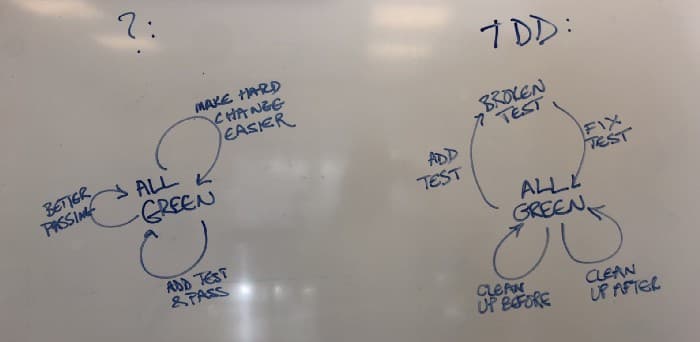
The foundation of TCR is increments, as it helps find an incremental way to make the same change, in a better and safer way, keeping all tests "green". But of course, is it possible to solve big problems in a small step? The answer is that most of the time this isn't possible, which is why TCR proposes the following approach:
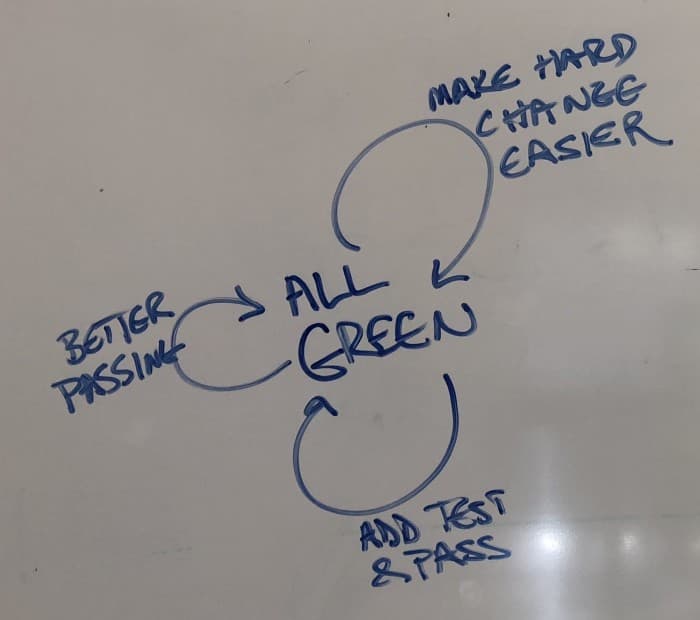
- Add a test and make it pass: every implemented idea must have an associated test, as soon as possible, even if it's not exhaustive or only tests part of the functionality, or even if it simply passes.
- Make it pass better: gradually, once the test passes, replace the incomplete implementation step by step with the real one.
- Make hard changes easy: don't carry out a large number of simultaneous changes — it's better to make changes one by one safely, using for example a helper function that returns the expected value, and step by step converting the implementation into the real one.
Comparison with TDD
Similarities
TCR helps practice TDD in the following ways:
- Don't write code that doesn't help pass a failing test: this can't be fully controlled, since you can write code that isn't checked by the test. To control this, you should consider test coverage and aim for 100%.
- Don't write more than one unit test at a time: this isn't possible because if it happened, you'd be forced to also implement more code to make the test pass, which would mean a much greater risk of deletion.
- Don't write more code than necessary to pass the failing test: if you write more than necessary, you risk having it deleted.
Differences
The key difference between TDD and TCR is found in the step where the test needs to pass: if the test fails, the attempt is reset.
Therefore, in TCR you never reach the state where the test is "red", because if that happens, you return to the "green" state.
The conclusion is that TDD allows us to stay in the "red" phase and pass the tests comfortably, while TCR tries to never reach that phase. In a sense, TCR can be considered a version of TDD without the "red" state.
Variations
Original
Kent Beck's original test && commit || reset --hard version. Among its disadvantages is, for example, the deletion of the test itself when the execution fails or a compilation error occurs.
$ ./test && git commit -am working || git reset --hard
In pseudocode:
if(test().success)
    commit()
else
    revert()
BTCR
This variant attempts to solve the original disadvantage of deletion in case of compilation failure by performing the build first.
$ ./buildIt && (./test && git commit -am working || git reset --hard)
In pseudocode:
if(build().failed)
    return
if(test().success)
    commit()
else
    revert()
The Relaxed
This variant also attempts to solve the other major disadvantage of deleting the test itself when execution fails. It's based on only removing changes in the source code, not in the directory where the tests are located.
$ git checkout HEAD -- src/main/
$ ./buildIt && (./test && git commit -am working || git checkout HEAD -- src/main/)
In pseudocode:
if(build().failed)
    return
if(test().success)
    commit()
else
    revert('src/main')
The Gentle
This variant aims to somehow save the previously introduced changes, so they can be recovered in case of failure and the bug can be found.
$ git stash drop 0 2&>/dev/null; git add -A && git stash push
$ ./buildIt && (git stash drop 0 2&>/dev/null; git add -A && git stash push)
# TCR kicks and reverts our code
$ git stash apply
The Split
This consists of splitting the scripts that build the system, run tests, etc. into different files in separate directories.
$ cat ./test
./scripts/buildIt && (./scripts/runTests && ./scripts/commit || ./scripts/revert)

$ tree script
scripts/
├── buildIt
├── commit
├── revert
└── runTests

$ cat scripts/buildIt
./gradlew build -x test

$ cat scripts/commit
git commit -am working

$ cat scripts/revert
# git reset --hard
git checkout HEAD -- src/main/

$ cat scripts/runTests
./gradlew test
The Buddy - Continuous TCR
Do you think running TCR manually feels too much like TDD? This variant tries to solve exactly that: as soon as an error is introduced in your code, it removes the change.
while true
do
    ./tcr
done

$ cat tcr
./buildIt && (./test && git commit -am working || git checkout HEAD -- src/main/)
In pseudocode:
while(true) {
    tcr()
}
function tcr() {
    if(build().failed)
        return
    if(test().success)
        commit()
    else
        revert()
}
The Watch Buddy
This variant is very similar to the previous one, with the difference that it doesn't run in an infinite loop — it waits for a change in the source code directory. It was introduced by Alejandro Marcu in a video where he experiments with TCR.
while true
do
    inotifywait -r -e modify .
    ./tcr
done

$ cat tcr
./buildIt && (./test && git commit -am working || git checkout HEAD -- src/main/)
In pseudocode:
while(true) {
    block_until_change_in_directory('src')
    tcr()
}
function tcr() {
    if(build().failed)
        return
    if(test().success)
        commit()
    else
        revert()
}
The Collaborator
This variant includes a new script that handles pushing changes and synchronizing teammates' changes when applicable.
while true
do
    git pull --rebase
    git push origin master
done
In pseudocode:
async {
    while(true) {
        Git.pull('rebase')
        Git.push('origin', 'master')
    }
}
./tcr
Local Buddy, Remote Team
A combination of The Collaborator and The Buddy variants:
do
    git pull --rebase
    git push origin master
done
## Open new Tab
while true
do
    ./tcr
done
In pseudocode:
async {
    while(true) {
        Git.pull('rebase')
        Git.push('origin', 'master')
    }
}
function tcr() { ... }
async {
    while(true) {
        tcr()
    }
}
The Storyteller: Beyond the Buddy
The goal of this variant is to, instead of simply reverting all changes that caused the tests to fail, communicate the error by indicating the line, file, etc. and asking the user whether they want to revert their changes or not.
Thomas Deniffel explains this variant in an article. In it, besides explaining this TCR variant, he mentions that his goal is to create an implementation that works with a chat or even a voice interface.
# The Buddy
while true
do
    build && ( test && commit || revert )
done

# Communicate in 'revert'
$ cat revert
messageContent = Git.getDiffAndWhatToReset
message = MessageGenerator.generateWith(messageContent)
Git.reset
print message
Example
Initial Setup
Install the Visual Studio Code extension Run on Save.
In the workspace configuration file rope.code-workspace or in the global VSCode settings, add the command to the extension configuration:
{
  "folders": [
    {
      "path": "."
    }
  ],
  "settings": {
    "emeraldwalk.runonsave": {
      "commands": [
        {
          "match": ".*py",
          "cmd": "cd ${workspaceFolder} && python ${file} && git commit -am working || git reset --hard"
        }
      ]
    }
  }
}
The command will execute every time a file with the .py extension (Python file) is saved in the project.
cd ${workspaceFolder} && python ${file}
It's necessary to navigate to the workspace project directory. Also, in this case, we'll execute the source code with Python instead of a test script since the tests are at the end of the file.
GitHub Repository
I've created a public repository on GitHub with the complete example code that Kent Beck demonstrates in the TCR Rope in Python Playlist.
After the initial setup, the following section demonstrates how TCR works through selected steps from Kent Beck's tutorial.
Rope in Python
Initially, we have the following code, corresponding to the Rope data structure, with:
- the to_rope(string) method, which converts a Rope to the String data type.
- the Rope class with the substring and concatenate methods already implemented.
- the String, Substring and Concatenation classes with their constructors and toString methods.
- the equals(rope, expected) method and the tests that have already been verified.
# Rope

# to do
# insert
# delete

# API
def to_rope(string):
    return String(string)

class Rope:
    def substring(self, start, length):
        return Substring(self, start, length)
    def concatenate(self, right):
        return Concatenation(self, right)

class String(Rope):
    def __init__(self, string):
        self.string = string
    def __str__(self):
        return self.string

class Substring(Rope):
    def __init__(self, rope, start, length):
        self.rope = rope
        self.start = start
        self.length = length
    def __str__(self):
        return str(self.rope)[self.start : self.start + self.length]

class Concatenation(Rope):
    def __init__(self, left, right):
        self.left = left
        self.right = right
    def __str__(self):
        return str(self.left) + str(self.right)

# Testing Framework
def equals(rope, expected):
    actual = str(rope)
    if actual == expected:
        return
    print(actual, " didn't equal ", expected)
    raise Exception()

equals(to_rope("abc"), "abc")
equals(to_rope("abcde").substring(1, 3), "bcd")
equals(to_rope("abcde").substring(1, 3).substring(1,1), "c")
equals(to_rope("abc").concatenate(to_rope("de")), "abcde")
We're going to implement the Delete method.
First, we create the new test:
equals(to_rope("abcde").delete(1, 3), "ae")
Next, we define the method as simply as possible, even if the implementation is fake:
def delete(self, start, length):
    "ae"
Since we forgot to return the result with return, TCR deletes both the test and the new code. In the console, we see the following error:
None didn't equal ae
Traceback (most recent call last):
    File "D:/repos/tcr-rope/rope.py", line 64, in <module>
        equals(to_rope("abcde").delete(1, 3), "ae")
    File "D:/repos/tcr-rope/rope.py", line 56, in equals
        raise Exception()
Exception
HEAD is now at a2bf467 working
After rewriting the test, this time we write the code correctly:
def delete(self, start, length):
    return "ae"
[master e1db4d5] working
 1 file changed, 4 insertions(+), 1 deletion(-)
Then, we make small incremental changes until the entire delete code is implemented, saving frequently to verify the test passes:
Step 1:
def delete(self, start, length):
    return "a" + "e"
Step 2:
def delete(self, start, length):
    left = "a"
    return left + "e"
Step 3:
def delete(self, start, length):
    left = "a"
    right = "e"
    return left + right
And so on until reaching the final implementation of the delete method:
def delete(self, start, length):
    left = self.substring(0, start)
    right = self.substring(start + length, len(self.string) - start - length)
    return left.concatenate(right)
The final result, applying TCR to the complete Rope implementation, is as follows:
# Rope

# API
def to_rope(string):
    return String(string)

# Implementation
class Rope:
    def delete(self, start, length):
        left = self[0:start]
        right = self[start + length : len(self)]
        return left + right

    def insert(self, rope, start):
        left = self[0:start]
        right = self[start : len(self)]
        return left + rope + right

    def __add__(self, addend):
        return Concatenation(self, addend)

    def __getitem__(self, index):
        if type(index) == int:
            return self.__get_single_item__(index)
        return Substring(self, index.start, index.stop - index.start)

    def __len__(self):
        raise Exception("Should have been overriden")

    def __get_single_item__(self, index):
        raise Exception("Should have been overriden")


class String(Rope):
    def __init__(self, string):
        self.string = string

    def __str__(self):
        return self.string

    def __len__(self):
        return len(self.string)

    def __get_single_item__(self, index):
        return self.string[index]

class Substring(Rope):
    def __init__(self, rope, start, length):
        self.rope = rope
        self.start = start
        self.leng = length

    def __str__(self):
        return str(self.rope)[self.start : self.start + self.leng]

    def __len__(self):
        return self.leng

    def __get_single_item__(self, index):
        return self.rope[index + self.start]

class Concatenation(Rope):
    def __init__(self, left, right):
        self.left = left
        self.right = right

    def __str__(self):
        return str(self.left) + str(self.right)

    def __len__(self):
        return len(self.left) + len(self.right)

    def __get_single_item__(self, index):
        if index < len(self.left):
            return self.left[index]
        else:
            return self.right[index - len(self.left)]


# Testing Framework
def equals(rope, expected):
    actual = str(rope)
    if actual == expected:
        return
    print(actual, "didn't equal", expected)
    raise Exception()


equals(to_rope("abc"), "abc")
equals(to_rope("abcde")[1:4], "bcd")
equals(to_rope("abcde")[1:4][1:2], "c")
equals(to_rope("abc") + to_rope("de"), "abcde")
equals(to_rope("abcde").delete(1, 3), "ae")

assert len(to_rope("abcde")[1:4]) == 3
assert len(to_rope("abc") + to_rope("de")) == 5

equals(to_rope("abe").insert(to_rope("cd"), 2), "abcde")

equals(to_rope("abcde")[3], "d")
equals((to_rope("abc") + to_rope("de"))[3], "d")
equals(to_rope("abcde")[0:4][3], "d")
Conclusions
Overall, I've observed that TCR is very useful for learning to implement changes and refactor step by step. It may seem a bit tedious at first to have to rewrite code, but that's precisely why you end up writing less code, optimizing and valuing tests. As Kent Beck says in his famous quote:
"Make the change easy and then make the easy change"
Therefore, I would recommend everyone to try this technique — the original version — whether with a simple example or a more complex one, as I believe it also helps understand part of TDD by changing your perspective, perhaps in a more forceful way, but this can be mitigated with the variations as we've seen.
As for me and the effect of TCR, I'd say that trying the original is necessary, but for day-to-day work I would use, for example, the The Relaxed or The Gentle variation, maybe even The Buddy in one of its versions.
For example, while working through the example I noticed that I sometimes found myself pressing Ctrl+Z to get back the code that failed and continue from there.
In fact, Kent Beck himself in another TCR example, substring, TCR style, creates a file where he saves the error messages each time it resets to keep the output and error logs and thus find the bug in his code.
He uses the following command with the Run on Save extension, which adds a redirect from stderr to stdout and saves it to a file called tcrfeedback:
cd ${workspaceFolder} && python ${file} > ../tcrfeedback 2>&1 && git commit -am working || git reset --hard
References
Articles by Kent Beck:
YouTube Videos:
Other Articles:
- TCR. How to use? Alternative to TDD? — Thomas Deniffel
- TCR Tool — Thomas Deniffel
- TCR Variants — Thomas Deniffel
- Test && Commit || Revert (TCR) — David Tanzer
Podcast:
- The HanselMinutes Podcast — Scott Hanselman
Example Code:
What I learned at MadVue 2026
Notes from my first in-person tech conference: nine MadVue 2026 talks on Vue, Nuxt, the JavaScript toolchain and AI in frontend, with the takeaway and slides for each.
Lo que aprendí en MadVue 2026
Notas de mi primera conferencia tech presencial: nueve charlas de MadVue 2026 sobre Vue, Nuxt, el toolchain de JavaScript y la IA en el frontend, con la idea clave y las slides de cada una.